
An online gaming ID may look like nothing more than a username, but the account behind it can contain considerably more information. Depending on the platform, it may connect your player profile, achievements, game history, friends, purchases, security settings, linked devices and account-recovery information.
That makes gaming accounts attractive targets for phishing, credential theft and account takeovers.
The phrase online gaming ID can also be confusing because different platforms use it differently. On PlayStation, for example, an Online ID is the public display name used to identify a player, while the sign-in ID is the email address used to access the account. Other services may use terms such as gamer tag, player ID, account ID or username.
Understanding that distinction is the first step toward protecting an account.This guide explains what an online gaming ID is, what information can be connected to it, how gaming account security works, the most common account-security risks, and what to do if your gaming account is compromised.
Quick Answer: What Is an Online Gaming ID?
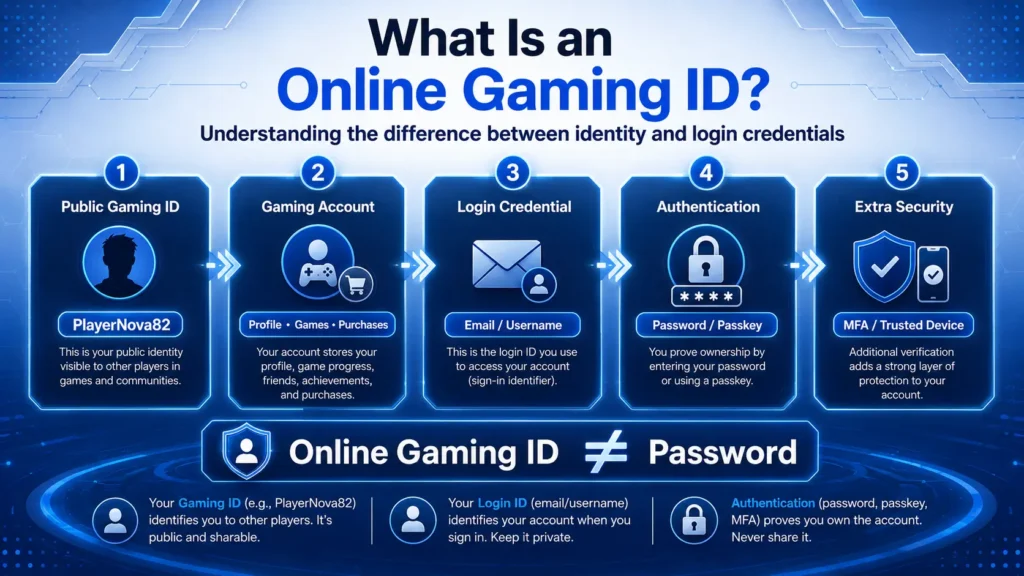
An online gaming ID is a unique identifier associated with a player’s account on an online gaming platform.
Depending on the service, the ID may be:
- A public username or display name
- A unique numerical player ID
- A platform-specific gamer tag
- An account profile connected to login credentials
- A verified account on an age-restricted or regulated service
The important distinction is that your public gaming ID is not necessarily your login credential.
For example:
Public Gaming ID: PlayerNova82
Sign-in credential: your email address or account name
Authentication credential: password, passkey or other authentication method
Second factor: authenticator app, security key, device approval or another MFA methodSomeone knowing your public gaming ID should not automatically give them access to your account.
Gaming ID vs Username vs Login ID: What Is the Difference?
These terms are frequently used interchangeably, but they do not always mean the same thing.
| Term | Typical Purpose |
| Gaming ID | Identifies a player or gaming account |
| Username / Gamertag | Public or semi-public name shown to other players |
| Player ID | Unique platform-generated identifier, often numerical |
| Sign-in ID | Credential used to begin logging in, often an email address |
| Password | Secret authentication credential |
| Passkey | Cryptographic alternative to traditional passwords |
| Verified Account | Account for which certain identity or eligibility information has been confirmed |
PlayStation illustrates this distinction clearly: its Online ID identifies a player publicly, while its sign-in ID is the email address used to access PlayStation services.Therefore, users should avoid assuming that every field labelled “ID” has the same privacy or security sensitivity.
What Information Can Be Connected to an Online Gaming Account?
The exact information varies between platforms, but an account may connect several categories of data.
Profile information
This can include:
- Gaming ID
- Avatar
- Display name
- Friends or followers
- Achievements
- Rankings
- Game history
Account information
This may include:
- Email address
- Password or passkey configuration
- Mobile number
- Security settings
- Recovery methods
Device and session information
Platforms may keep information about:
- Signed-in devices
- Consoles
- Browsers
- Active sessions
- Account activity
Purchase or payment information
If purchases are supported, the account may also connect to:
- Purchase history
- Digital content
- Subscriptions
- Stored payment preferences
This is why losing access to a gaming account can mean losing considerably more than a username.
How Does Online Gaming Account Security Work?
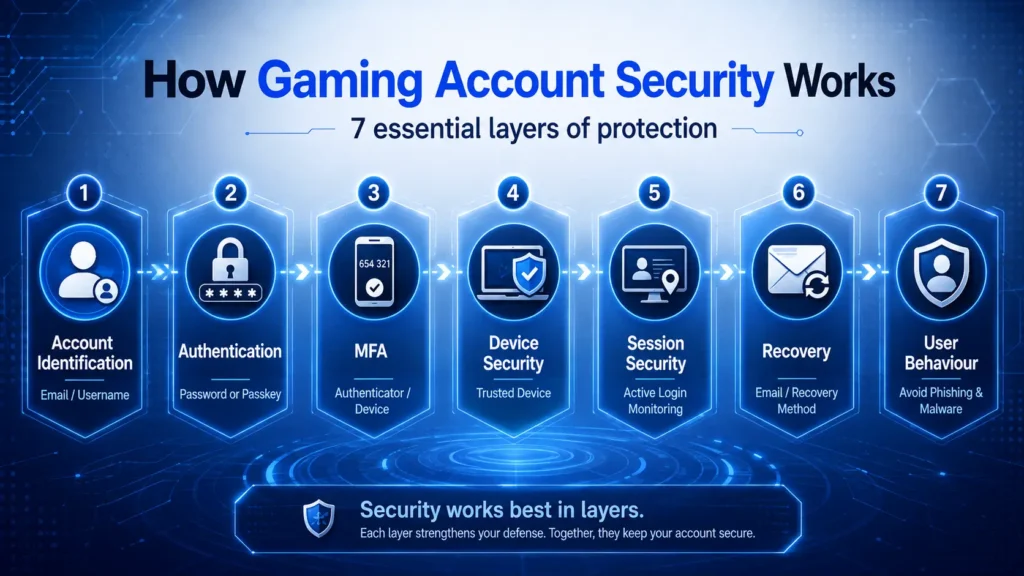
Gaming account security works through multiple layers rather than one single security feature.
A secure account generally depends on:
- Identification
- Authentication
- Multi-factor authentication
- Session and device controls
- Recovery security
- Platform-side security
- User behaviour
Understanding each layer makes it easier to see how account takeovers happen.
1. Identification: Who Is the Account?
The first layer identifies which account is trying to sign in.
That might involve entering:
- An email address
- Account name
- Player ID
- Phone number
Identification alone does not prove that the person entering the information owns the account.
That is the job of authentication.
2. Authentication: Can You Prove the Account Is Yours?
Authentication verifies that the person attempting to access the account possesses the required credentials.
The traditional method is:
Account identifier + password
However, passwords have significant weaknesses.
NIST explains that passwords can be stolen through phishing, exposed through data breaches or reused by attackers when people use the same password across multiple websites.That is why password-only protection is increasingly being supplemented or replaced by stronger authentication methods.
How Should You Create a Secure Gaming Password?
For accounts that still require passwords, length and uniqueness matter more than creating an unnecessarily complicated pattern you cannot remember.
Current NIST consumer guidance recommends using a password of at least 15 characters when a password is being used as a single authentication factor. NIST also recommends password managers for generating and securely storing unique passwords.
A secure approach is:
Use a unique password for every gaming account.
Do not reuse the password for:
- Your email
- Social media
- Banking
- Other gaming platforms
- Shopping accounts
Password reuse creates a particularly important risk called credential stuffing.
If one service suffers a data breach and your email/password combination is exposed, attackers may try those same credentials on other websites.A unique password limits how far one breach can spread.
What Is Two-Factor Authentication for Gaming Accounts?
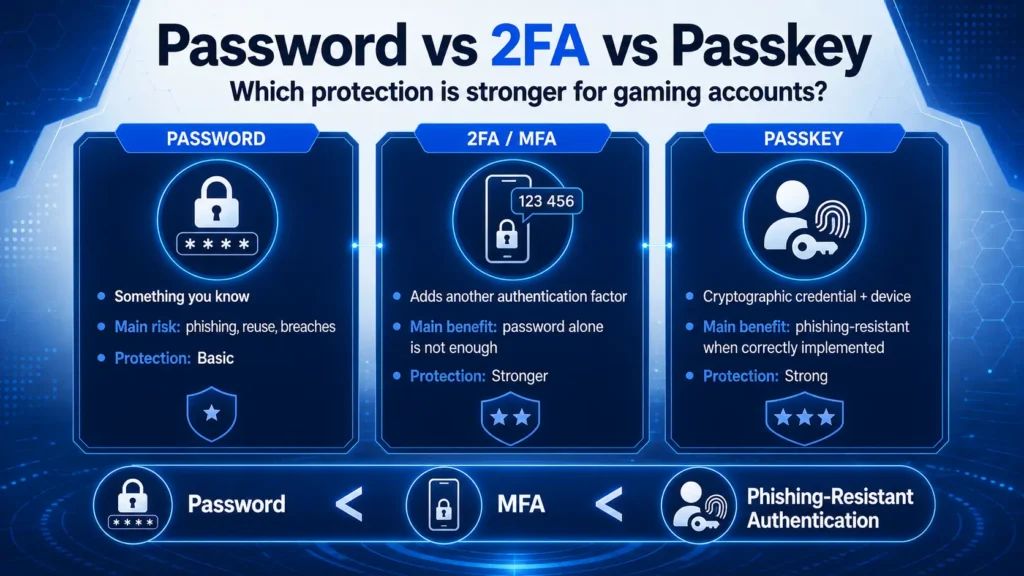
Two-factor authentication (2FA) adds another proof of identity beyond the password.
2FA is a type of multi-factor authentication, or MFA.
NIST groups authentication factors into three broad categories:
- Something you know: such as a password or PIN
- Something you have: such as a security key or trusted device
- Something you are: such as a fingerprint or facial recognition
Using authentication factors from different categories provides stronger protection than relying only on a password.
For example:
Password + authenticator app
is stronger than:
Password onlybecause an attacker who steals your password still needs the additional authentication factor.
Are All Forms of 2FA Equally Secure?
No.
Common second-factor methods include:
- SMS codes
- Email codes
- Authenticator apps
- Push approvals
- Hardware security keys
- Passkeys
Any properly implemented MFA is generally preferable to relying only on a password, but some methods provide stronger phishing protection than others.
NIST specifically notes that manually entered one-time codes, including some OTP methods, are not considered phishing-resistant, because a fraudulent website can potentially trick the user into entering and relaying the code.Where available, phishing-resistant authentication methods such as FIDO/WebAuthn-based authenticators provide stronger protection.
What Is a Passkey and Is It Safer for Gaming Accounts?
A passkey is a cryptographic sign-in credential designed to replace traditional passwords.
Instead of typing a password, users can generally authenticate using the security mechanisms already available on their device, such as:
- Fingerprint
- Face recognition
- Device PIN
NIST explains that passkeys use unique cryptographic credentials and are substantially harder to steal through conventional phishing than passwords.
Gaming platforms are also adopting them. PlayStation, for example, supports passkeys and describes them as a faster and more secure sign-in option.If your gaming platform offers passkeys, they are worth considering.
Why Your Email Account Is Part of Gaming Account Security
A commonly overlooked security issue is the email account connected to your gaming profile.
Even if your gaming password is strong, an attacker who gains control of your email may be able to:
- Request a password reset
- Receive verification messages
- Intercept security alerts
- Interfere with account recovery
Steam specifically warns that compromising the email account linked to Steam can enable an attacker to reset account credentials.
Therefore:
Protect your email account at least as strongly as your gaming account.
Use:
- A different password
- MFA or a passkey
- Updated recovery information
- Security alerts
Your recovery account should never be the weakest link.
What Are the Most Common Gaming Account Security Threats?
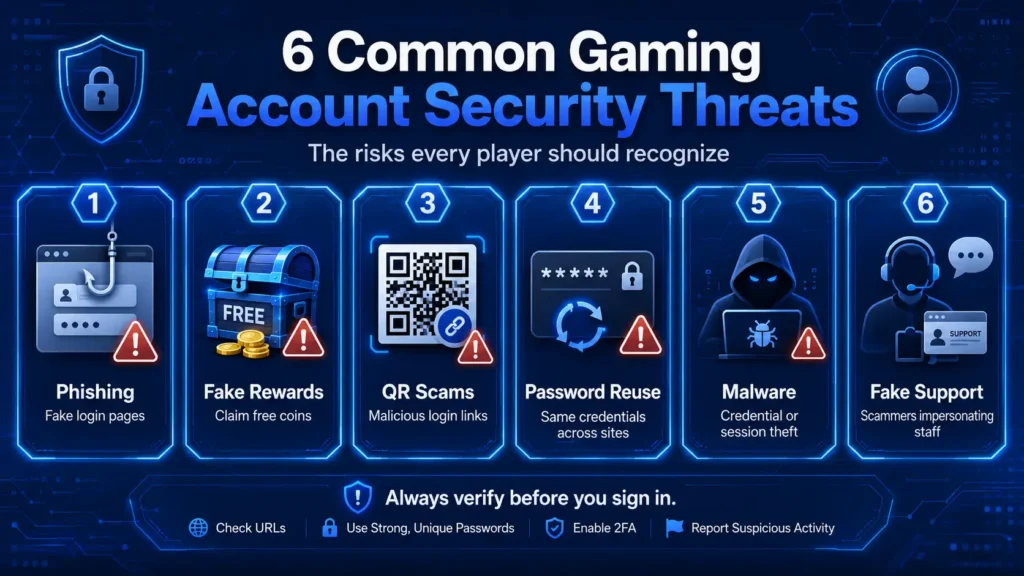
Phishing
Phishing attempts trick users into giving credentials to an attacker.
A fake page may imitate:
- A gaming login screen
- Tournament registration
- Free reward page
- Account-warning notice
- Customer support
- Giveaway page
NIST describes phishing as messages or sites designed to convince users to disclose credentials or other sensitive information. Steam also documents scams where users are directed to fraudulent tournament or voting websites designed to steal login information and security codes.
Fake Rewards and Free Currency Scams
Messages promising free:
- Coins
- Skins
- Credits
- Rewards
- Premium items
may exist primarily to collect account credentials.
PlayStation explicitly warns users not to provide account information to websites offering free virtual currency in exchange for personal information.If an offer requires you to log into an unfamiliar domain, treat it with caution.
QR Code Scams
QR codes can also send users to fraudulent login pages.
PlayStation specifically advises users to scan only QR codes they trust and to avoid codes sent by people claiming they can provide account access or rewards.The same principle applies to shortened URLs and unfamiliar login links.
Credential Reuse
Using the same password on several websites gives attackers more opportunities.
A breach at an unrelated service could expose credentials that are later tested against your gaming account.This is why unique passwords are one of the most important account-security habits.
Malware and Keyloggers
Not every gaming account is stolen through a fake login page.
Malware can potentially collect credentials or abuse an already authenticated device.Steam’s account-recovery guidance specifically recommends scanning a computer for viruses, keyloggers, spyware and other malicious software when an account is compromised.
Compromised Shared Devices
Logging in on a device you do not control introduces additional risk.
Public or shared computers may:
- Save browser sessions
- Store login information
- Contain malicious software
- Remain signed into your account
PlayStation advises users not to sign into their accounts on shared devices such as public computers and recommends signing out remotely when necessary.
Fake Customer Support
A scammer may pretend to be:
- Platform support
- An administrator
- Tournament staff
- Moderator
- Security representative
Legitimate support should not need your password or authentication codes.
Steam states that its support representatives will never ask users for their account password.Treat requests for passwords, OTPs or recovery codes as major warning signs.
Can You Safely Share Your Online Gaming ID?
It depends on which ID you mean.
A public display name or gamer tag is often designed to be visible to other players.
Your private credentials are different.
Usually public or semi-public
Depending on your privacy settings:
- Gamertag
- Display name
- Online ID
- Avatar
- Public player profile
Keep private
Never casually share:
- Password
- One-time authentication code
- Recovery code
- Passkey credentials
- Email-access credentials
- Security answers
- Private recovery links
A useful rule is:Your player identity may be public. Your authentication credentials should remain private.
What Is Gaming ID Verification?
Gaming ID verification is different from a gaming username.
Verification means a platform confirms certain account or identity information.
This may involve:
- Email verification
- Phone verification
- Age verification
- Identity verification
Requirements differ significantly between services and jurisdictions.
For example, regulated online gambling services in Great Britain must verify customer identity before allowing gambling, including information such as name, address and date of birth.
That does not mean every online game requires KYC or government-issued identification.
Ordinary entertainment gaming accounts may require only account and email verification.Therefore, avoid websites claiming that every “gaming ID” universally requires government identity documents. The requirement depends on the type of service and the laws applying to it.
How Can You Tell Whether a Gaming Login Page Is Legitimate?
Before entering credentials, check several things.
Check the domain carefully
Attackers often use domains that differ from the legitimate website by only one character.
For example:
officialgame.com
and
officia1game.com
can look similar at a glance.
Don’t trust HTTPS alone
The padlock symbol means the connection is encrypted.
It does not automatically prove that the website itself is legitimate.
Phishing websites can also use HTTPS.
Open the platform directly
Instead of clicking an unexpected login link:
- Open the official application, or
- Type the known official website address yourself.
Be suspicious of urgency
Messages such as:
- “Your account will be deleted in 10 minutes”
- “Verify immediately”
- “Claim your reward now”
- “Your account has been reported”
are often designed to prevent you from checking whether the request is genuine.
How to Keep an Online Gaming ID Secure
Use this practical security checklist:
- Use a unique password for the gaming account.
- Prefer a password manager instead of reusing passwords.
- Enable MFA whenever the platform offers it.
- Prefer phishing-resistant authentication or passkeys when available.
- Secure the email account connected to the gaming profile.
- Never share passwords, OTPs or recovery codes.
- Avoid logging in through unexpected links.
- Check domains carefully before entering credentials.
- Keep your operating system, browser and gaming software updated.
- Avoid downloading unknown gaming tools or files.
- Review active sessions and connected devices periodically.
- Sign out of shared devices.
- Enable security notifications where available.
- Keep account-recovery details current.
These measures work best together. No single security control eliminates every account-takeover risk.
What Should You Do If Your Gaming Account Is Hacked?
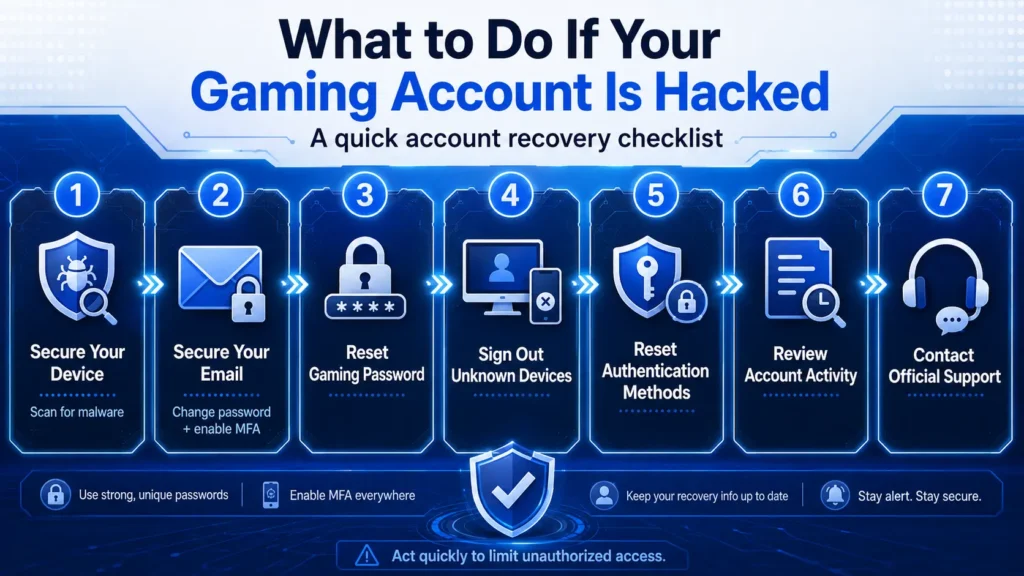
If you suspect unauthorized access, act quickly.
1. Secure the device
If malware may be involved, scan the device before resetting credentials.
Steam recommends checking compromised devices for viruses, spyware and keyloggers before completing account recovery.
2. Secure your email
Change the password on the email account linked to the gaming account if you believe it may also be compromised.
Enable MFA or a passkey there as well.
3. Change the gaming password
Use a completely new password.
Do not simply add one number to the previous password.
4. End unknown sessions
Use the platform’s security controls to:
- Sign out other devices
- Remove unfamiliar devices
- Revoke sessions where available
5. Reset authentication methods
If you suspect an authenticator or recovery method was exposed, replace it.
6. Review account activity
Check:
- Profile changes
- New linked accounts
- Unknown devices
- Unauthorized purchases
- Changed email addresses
- Changed security settings
7. Contact official support
Use the support page reached through the platform’s official website or app.Do not rely on a “support agent” contacting you through an unsolicited private message.
Why Does Gaming Account Security Matter Even If You Have No Payment Details?
A gaming account can still have value without stored payment information.
Attackers may target accounts because they contain:
- Purchased games
- Digital items
- Rare cosmetic items
- Achievements
- Account reputation
- Friends lists
- Personal information
- Linked social accounts
Compromised accounts can also be used to send phishing links to people who trust the account owner.
Steam notes that suspicious content posted by a compromised account can include links and messages used for phishing, account theft and scams.Protecting the account therefore protects both you and the people connected to you.
Password vs 2FA vs Passkey: Which Is Better?
| Security Method | What It Does | General Security Level |
| Password only | Uses one secret credential | Basic |
| Password + SMS code | Adds another authentication step | Better |
| Password + authenticator | Adds possession-based verification | Stronger |
| Hardware security key | Uses cryptographic authentication | Very strong |
| Passkey | Uses device-bound cryptographic credentials | Strong and phishing-resistant when properly implemented |
The exact implementation matters, but the broad principle is simple:
Do not depend on a password alone when stronger authentication is available.NIST recommends MFA and increasingly encourages phishing-resistant authentication.
Common Online Gaming ID Security Myths
Myth 1: A Complicated Password Is Enough
A password cannot protect you if you knowingly enter it into a phishing website.
That is why MFA, passkeys and phishing awareness matter.
Myth 2: Nobody Can Hack Me If They Don’t Know My Gaming ID
Attackers frequently target email addresses, reused passwords, compromised devices and phishing victims rather than guessing public player IDs.
Myth 3: Two Passwords Count as Two-Factor Authentication
They do not.MFA requires factors from different authentication categories, such as something you know combined with something you have.
Myth 4: An OTP Means an Account Cannot Be Phished
Not necessarily.NIST states that manually entered OTP methods are not considered fully phishing-resistant because an attacker may relay a code through a fraudulent login page.
Myth 5: My Gaming Account Doesn’t Matter Because I Don’t Store Money in It
The account may still contain purchased content, digital items, personal data and access to other connected services.
Online Gaming ID Security: Key Takeaways
An online gaming ID identifies a player’s account or profile, but it should not be confused with the credentials used to access that account.
The most important security principles are:
- Keep authentication credentials private.
- Use a unique password if passwords are required.
- Secure the associated email account.
- Enable MFA.
- Prefer passkeys or phishing-resistant authentication when supported.
- Avoid unexpected login links and QR codes.
- Never give passwords or security codes to supposed support agents.
- Keep devices and software updated.
- Review account sessions and security alerts.
- Act quickly when suspicious activity appears.
Strong gaming account security is not one setting. It is a combination of secure authentication, safe account-recovery methods, platform protections and careful user behaviour.
Frequently Asked Questions About Online Gaming IDs
What does online gaming ID mean?
An online gaming ID is a unique identifier associated with a player’s account on an online gaming platform. Depending on the platform, it may be a public display name, gamer tag, numerical player identifier or part of a broader registered account.
Is an online gaming ID the same as a username?
Sometimes, but not always. Some platforms use the gaming ID as the public username, while others maintain separate player IDs, display names and sign-in credentials.
Is it safe to share my gaming ID?
A public display ID may be designed for sharing with other players. Passwords, OTPs, recovery codes and other authentication information should never be shared.
Can someone hack my account with only my gaming ID?
Knowing a public gaming ID normally should not be enough to access an account. Account takeover usually requires compromised authentication credentials, recovery access, an authenticated device or another security weakness.
Should I use the same password for gaming and email?
No. Your gaming account and its associated email account should use different, unique passwords. A compromised email account may allow an attacker to reset gaming credentials.
Does 2FA protect a gaming account?
Yes, MFA can significantly strengthen account security because an attacker needs another authentication factor in addition to the password. Some MFA methods provide stronger phishing resistance than others.
Are passkeys safer than passwords?
Passkeys are designed to resist many common password attacks, including traditional phishing. NIST recommends them as a stronger authentication option where supported.
What should I do if someone asks for my gaming OTP?
Do not provide it. A one-time authentication code is intended to prove that you control the authentication method. Treat unexpected requests for OTPs as suspicious.
Why would someone steal a gaming account?
Accounts may contain purchased content, digital items, personal information, valuable profiles or connections to other users. Stolen accounts may also be used for further scams.
What should I do first if my gaming account is compromised?
Secure the device and associated email account, change the gaming password, revoke unauthorized sessions, review authentication methods and contact official platform support.
Does every online gaming ID require KYC?
No. Requirements vary by platform, service type and jurisdiction. Some regulated or age-restricted services may require identity verification, while ordinary entertainment gaming accounts may not.
Conclusion
An online gaming ID is the digital identifier connected to your presence on a gaming platform, but protecting that identity requires more than choosing a username and password.
Modern gaming account security combines unique credentials, multi-factor authentication, passkeys, secure recovery methods, trusted devices and protection against phishing and malware.
The most effective mindset is to treat a gaming account like any other valuable online account: keep credentials private, secure the connected email address, use the strongest authentication available and verify unexpected login requests before taking action.Those habits make it substantially harder for attackers to turn a public gaming identity into an account takeover.